
Creativebits.org

an All Creative World site
Ivan's picture

Rock your stars

When you draw with the Star tool there are several keys that modify your star on the fly. They are extremely useful to get the exact shape you want for your illustration.
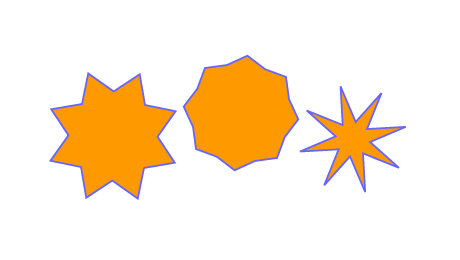

By pressing the Apple key while dragging the star you can change the length of the arms. Press the Space to reposition the star while drawing.


The Up and Down arrow keys will change the number of arms your star has.


And finally the most spectacular Star tool game is revealed if you press the "~" key while moving your cursor around.

Commenting on this Blog entry is closed.

claredickerson's picture
1 pencil

the second one doesn't work for me. is it command, or a different key, to chance the length of the arms?

Ivan's picture

Which version of AI are you using?

Creativebits is a blog about creativity, design and Macs. We also have a critique section where you can post your work to get opinions and a forum to discuss any design related topics.

Recommend us on Google

Do you need a great new logo?

If you need a logo for your company or product you can get it done with us.
In our logo store you can pick from over 28,000 pre-made logos that will be customized to your name for free or you can post a contest for us for just $250 and our designers from all over the world will submit dozens of logo design suggestions to your specific needs.

Marketplace