
Creativebits.org

an All Creative World site
Ivan's picture

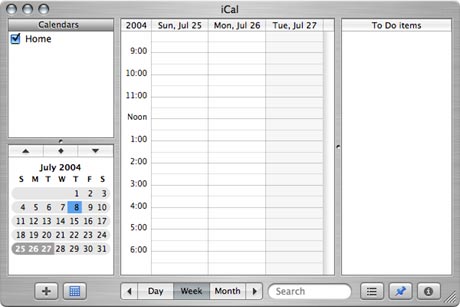
Customize your weekly view

If you only want to see 3 days in the weekly view, press Apple-Alt-3. In fact you can press any number from 1-7 to customize the layout. Notice that the days shown in the main view will be highlighted in the small monthly calendar in the bottom left corner.
Commenting on this Blog entry is closed.

Anonymous's picture

There is no Alt on a Mac.

Ivan's picture

Yeah, I know, and there is no Apple key either ;)

In my terminology:
Apple=Command
Alt=Option

I believe my way is just simpler for novice users. And advanced users like you will certainly what I'm trying to say.

Many times when I tell somebody just click Option or Command they can't find the keys, because the keys don't say neither of the two terms on them. However Apple and Alt are clear, since they are clearly marked.

On the other hand I guess it would be wise to use the standard terminology, let the newbies learn. :)

Mat's picture

Funny, my option key is clearly marked with both option and alt on a standard Apple keyboard.
As for the command key, however, I usually have to refer to the "curly hash" to which I get, "what's a hash?"

Ivan's picture

"What's a hash?" - LOL! :D

Creativebits is a blog about creativity, design and Macs. We also have a critique section where you can post your work to get opinions and a forum to discuss any design related topics.

Recommend us on Google

Latest critique

Do you need a great new logo?

If you need a logo for your company or product you can get it done with us.
In our logo store you can pick from over 28,000 pre-made logos that will be customized to your name for free or you can post a contest for us for just $250 and our designers from all over the world will submit dozens of logo design suggestions to your specific needs.

Marketplace