
Create a mosaic with MacOSaiX
Ivan | Tue, 2004-07-20 16:39Here is a jewel for Mac OSX. Long time ago, I think Time magazine had a cover page made with such technique. At that time the mosaic was made by a skilled artist who manually created a visual that was made up of hundreds of smaller images. Now you can create similar mosaics using MacOSaiX.
There are many options available in this little application. You can select the number (the more the better), the shape and the content of the individual pieces. And most importantly you don't necessarily need to have a collection of thousands of images of a particular theme. You can actually automatically pull images from Google images with this application. Imagine, you can create a cool poster for Valentine's day for example, made up of images that are related. Usually I plan the keywords for the Google images search very carefully. The more keywords you add the better quality your mosaic will be, since MacOSaiX will have more choice to pick and match the colors from. Also, I usually exclude gifs because gifs are usually illustrations and elements of the web site design, rather than related photos. So an example search would be: love, kiss, heart, -gif, -porno, -sex.
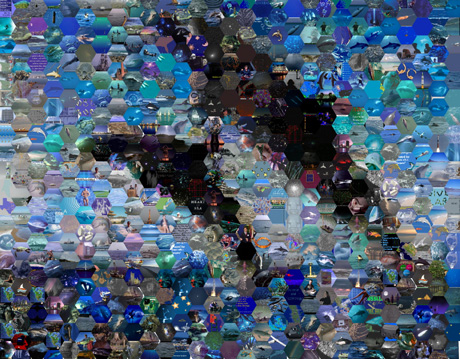
Have fun! Oh did I mention that it's free?
Commenting on this Blog entry is closed.


Just want to let you know that MacOSaiX crashes under Panther. I contacted the developer months ago about this, and he plans on fixing it when he as time, but he hasn't released a new version as of yet.
Sorry to hear that. It works fine for me though.
Works fine for me on Panther. Though I do have to say that you need to be prepared to have lots of space available for the mosaic while the program does it's work. I quickly chewed up 3GB of free disk space on my system while working on one. I quickly tossed some sacrificial folders with stuff I wouldn't miss to make more room so the mosaic could finish.
You Panther might be crashing when it was running out of space? I got a "disk full" warning that I had never seen before on my system. But like I said, I freed up some space quickly and had no problems beyond that.
I've been using it for half a day just with the random glyphs and it crashes (panther 10.3.4)
I wonder if saving it every minute may free up some disk space used.
Altough I have a new g5 with plenty HD space.
Pompo
MacOSaiX works much more efficiently grabbing images from Google than it does when you try generating an image with the "random glyphs" option.
Why?
Well, those random glyphs are generated by using characters from the fonts you have installed on your system, plus a color for the character and a color for the background.
When you multiply the number of characters X the number of character colors X the number of background colors, you'll quickly realize that the application is churning through literally billions of possibilities. That'll give any machine fits.
Sure, it crashes a lot under Panther, but it's worth restarting it repeatedly, because eventually it does produce really great results!