
Mighty mouse gutting and cleaning
Ivan | Tue, 2007-01-02 20:59If you have been using your favorite Apple mighty mouse for at least 2-3 months you must have experienced the cursor getting stuck when rolling the nipple. It drove me crazy, so I decided to take the mouse apart and clean it.
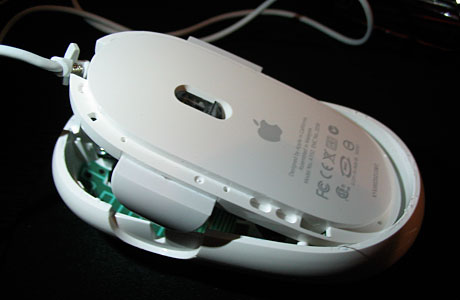
First I removed the outer grey rim. It seemed to me it was glued to the outer shell. This is the only glued part. Then, I removed the inside grey rim. Both pop off relatively easily if you use a plastic ruler to take them apart bit by bit.
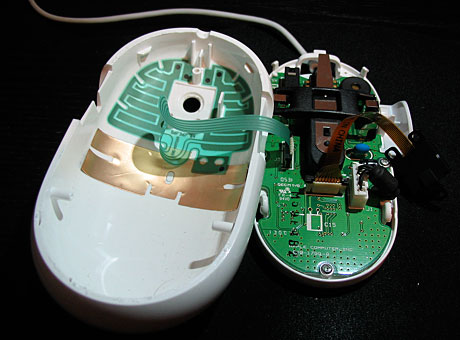
Once this is done you can separate the bottom part of your mouse from the outer shell. Be careful, they are still attached together by some wires that rip easily.
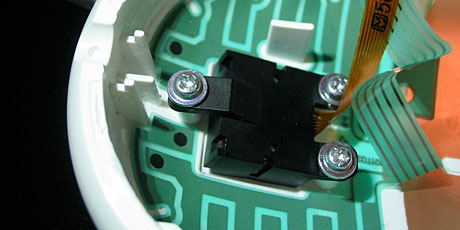
Next, the little black box holding the roller ball should be opened by unscrewing 3 bolts carefully. I used a swiss knife because I had apply serious force to loosen them up.
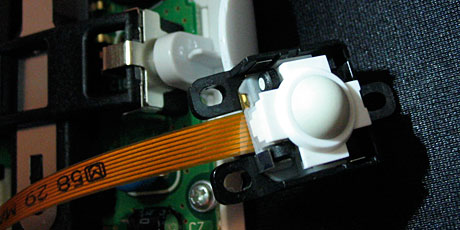
Once you open the black box the ball will be exposed. It sits within a white plastic saddle. You will have to carefully remove the white plastic. It pops off very easily.
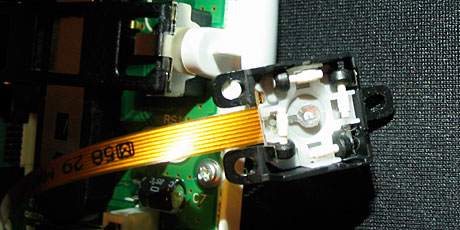
Under the plastic you will see 4 tiny rollers that fly off easily, so be extremely careful. Remember their position.
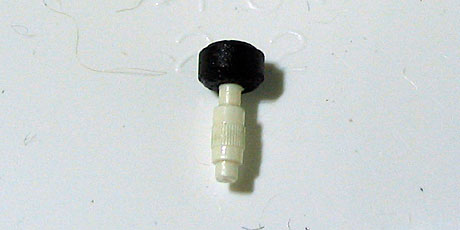
The black head of the rollers are small magnets so using a metallic screw driver can be very useful to remove them. However putting them back is best done by hand. It is a little tedious, so take your time. If you have big fingers, you may want to ask for help from somebody with more petite hands. Take each roller one by one and clean the dirt from the white middle part on them. You should also clean the inner shell of the mouse.
Now, carefully revert the whole process. The most difficult will be to put the white saddle back because all the magnetic rollers are moving around and you need to concentrate on all 4 at the same time. The last part is the outer rim, which I glued back with super glue carefully applying tiny dots of glue to the shell's edge.
The mouse works as new. Good luck cleaning your rodent!
Commenting on this Blog entry is closed.


Thanks though Ivan, i'll certainly be cleaning mine.
Does anyone use the side buttons? I find them totally unusable as they are activated randomly in normal mousing.
When I first got mine, I was pretty ticked about the buttons, too. But when I figured out you could use them for Expose (F10), I couldn't resist. They take a lot of getting used to, but I think it's worth it - especially if you like to have lots of stuff going on at once, and want to be able to switch around quickly. I also have the nipple-click function set for my Dashboard (F12), and my Desktop Expose set for my bottom-right screen corner. This way I can view all of my windows, expose my desktop, and get in and out of my Dashboard without ever taking my hand of the mouse.
Despite the initial learning curve with the side buttons, I'm quite pleased with this mouse.
and no problems. although I am a wacom geek, so the mouse doesn't get the full on daily bashing like you guy's mice'essses'
"The definition of a liberal is someone who's afraid to take their own side in a fight."
Same story in Italian
I had the same problem with my Mighty Mouse - which has now survived 1 year of active duty. Considered gutting it, but didn't have the guts.
Another way of cleaning the little trackball which work really well is to hold the Mighty upside down, press down on the ball really hard (which surprisingly enough doesn't seem to damage it) and blow into the hole while rolling the ball. All the dust and grime that collects in there comes out nicely and the ball works fine again. (And the mouse is still intact.)
I've had to do this twice in the last year.
As for those side buttons - used it once, won't be using it again.
The Construct Agency
Building Creative Brands for People
I think those few milligrams of greasy sticky gue would not have come off with this method in my case. I don't know how this happens, because I only touch my Mac with clean hands.
I don't have a mighty mouse, but sweat and body oil always gets on stuff you touch even if you wash your hands. I always clean my Wacom tablet, mouse, and pen with rubbing alcohol. It doesn't matter if some of it gets inside the mouse or pen because it evaporates anyway.
I just use a lint-free cloth and rubbing alcohol. I gently rub the track ball back and forth until the obstruction is clear. The alcohol doesn't hurt the electronics, and evaporates pretty quickly.
Actually taking the mouse apart makes me squeamish.
I think this could work if you put enough alcohol on the rubber ball that can transfer to the rollers and the dirt can transfer back to the ball.
Awsome tutorial. Now lets see how you can stop the mouse's side buttons from uncontrollably clicking. That pisses me off.
That's actually quite easy to do. Go to the Mouse tab in your Keyboard & Mouse section of System Preferences. From there you'll be presented with a dialog to set actions for all the buttons of your Mighty Mouse. Select the side buttons drop down and choose "Off". From then on the side buttons will ignore any clicking.
Well, I decided to clean my new Apple supplied mouse for my G5. After having in for about a year, it refused to work, so I got out my screwdriver and proceeded to make sure this mouse would never work again. I got the bottom off, whereupon parts decided to drop everywhere. Of course my big fingers did not help. In the garbage it went; $50 bucks! Bought another one last month (another $50) and already it has inflicted my curser with insanity. The curser does what it wants, up, down, sideways, off the screen, and forget about those side buttons. So now, after one month, I have an order in for a Kensington. Where is the quality Apple? Can't you make something that will last, have value and work? You have a name to protect, why mess it up with a lousy, cheap mouse??
Jimmy
Hey people, I can agree with the post to which I am replying. Apple has a first class name and I have owned nothing but Apple since they came on market, however, I just bought a 2.66MHertz and I am deeply sorry. I find the keyboard and mouse are made outside the U.S. which is a very big NO NO. We here in America have the best production people in the world, even though it cost a little more. I will pay more if it says "Made in U. S. A." The one I have now has a cheap keyboard, a cheap mouse and who knows about the guts of the computer itself. If Apple does not start using quality material and labor in its products like it has till now, I may have to go else where or get off the damn internet. Whew, hate to think that.
Get off the cheap kick Apple and use some American labor and material. It will pay.
Jimmy
though i still prefer to use my oyster knife :D
keep it up man!
About the cleaning of these nipples.
I stumbled upon an easier way of cleaning me nipples. Well, err, not mine.
But anyway, rather than actually cleaning them, i have found that if you simply turn the mouse over and pressing down lightly run the nipple in an up and down fashion atop an unopened magazine.
Any one of those plastic cellophane magazine covers will do. The only downside, apart from not being able to scroll down with my battery installed Miaghty mouse is that it occurs quite often, and i need to have an unopened magazine cover laying around at hand.
Still, i have no idea why this should work at all. Maybe it just works with my mouse. I dunno?
We Brits do things differently, but we still get shot at!
Thanks alot mate, it worked!!
Cheers! :D
Yes, my roller stopped responding in several dimensions, it was quite infuriating considering what I originally spent on the dern thang. (I just googled and saw them advertised for $28 new.) I had a can of RadioShack 'precision electronics cleaner' ( part 640-4345 ) which is basically environmentally 'safe' freon ( or so they say ), I turned the mouse over, depressed the ball, and sprayed away, all while rolling the ball now and then and shaking out the access liquid. Then I used canned dust remover ( probably another kind of safe freon, by CleanSafe, www.iqproducts.com ) and sprayed into the gap by the ball. I repeated the procedure for good luck, and voila! it all works fine now.
ripped the guts out and pieced it back together works a treat cheers...!!!
Congrats! :)
MacRankin the Brit has put my mouse back on its wheel! I basically poured half a cup of office equipment cleaner(87% alcohol) down the roller nipple and used a lint free clothe to rub it in all directions whilst holding it upside down. I did this about 5 times and my mighty mouse still wouldn't scroll DOWN! How frustrating!! I had almost given up when I saw MacRankin's strange entry that suggests rubbing the nipple quite hard against a cellophane magazine cover and...Voila! Can you believe it, the mouse has finally loosened up. So if you were a little afraid of opening up the mouse and regluing it, try the alcohol and the magazine cover trick!! :)
I posted a comment on this web page and after spell checking I wanted it read back to me.
I highlighted the text, pushed two keys (shift s) and could not get the computer to read the text as it says it would. Prolly one of those chinese critters playing around inside.
I haad to copy it to my word processor, read it and paste it back. Don't know what happened. Any clues?
Jimmy
Thanks so much for this post and the detailed pictures...
I tried all the tricks, which would work for a short amount of time, but the MM would quickly stop working again. It's about two years old, so i figured I would give this tear down a try, and in the worst case, just go buy a new one.
The take apart is easy... but man.. those roller-balls are a bi**ch to get back on... took me 3-4 attempts to place them, and get the ball back in, and flipped back into position without have one of them get dislodged, but this DOES WORK!!
I was not surprised to see those rollers pretty much gummed up after two years, not a ton of junk in there mind you, but enough to stop the wheel from working.
I would have never attempted this without finding this post, and your instructs, and pictures... I'd buy you a beer if you were local!
Thanks.
Wilbah - Read my posts and give it a try. I GUARANTEE you it will work!!! LOL...man, how can I be this excited about finding out how to fix this little but ANNOYING problem? I JUST found this out so no sure how often I'll have to clean it the way I instructed, but hey... my MM works now.
You don't have to take it apart!!!! OMG, I found how to fix the dang thing!!! The nipple was driving me MAD and I wasn't about to go buy a Magic Mouse, so I started to do research.... There was a video from this little Indian kid who turned the mouse off, rubbed the nipple on a piece of clean paper and wiped it off with a cloth. The mouse still didn't work that great... Here's what I did and found it worked like NEW! Get a cloth that has a little traction and absorbs oil really well...LIKE...the little pieces of cloth you get when you buy a new pair of glasses or something like that. If you don't wear glasses, then go and get one, duh... they're CHEAP. Use this to rub the heck out of the nipple and all the oil from your fingers and crap will come off. Your Mighty Mouse will become 'MIGHTY' once again... Let me know how it goes!!!