
Create an html newsletter on your Mac
Here is an easy and simple tutorial on how to set up and send out your own html newsletter using Mail.app on a mac. I am sure it can also be done on Thunderbird, Entourage and on any other email clients. For my purposes, I used Mail.app. The applications I used are Photoshop, Dreamweaver, Mail, Safari and Transmit (FTP).
Disclaimer: It has come to our attention, people are using our newsletter as their own work. You are creative people. Design your own newsletter, do not steal. Please DO NOT USE our newsletter design, any of the graphics or verbiage without our permission for educational or commercial use. All design, graphics and code is the property of Mayhem Studios.
Step One
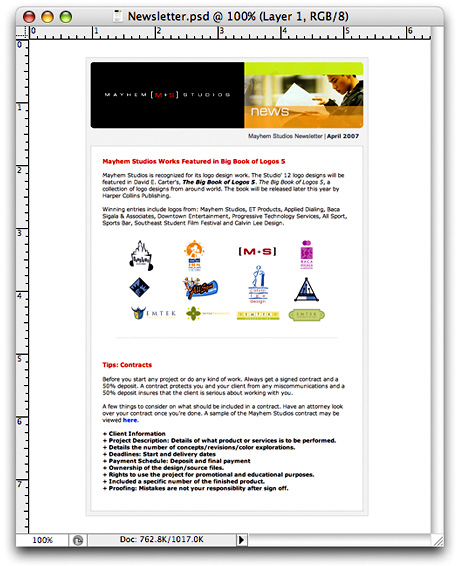
Design and layout the basic look of your newsletter in Photoshop. You don't have to place every element on the mock up, since you can create that in the final html.
Step Two
Once you have your newsletter laid out in Photoshop. Slice up and optimize your images and create the html page. You will need some basic knowledge of html when building your page. If you're not to web savvy. You can use Image Ready that comes with Photoshop and save the html/images out or use a WYSIWYG application like Dreamweaver.
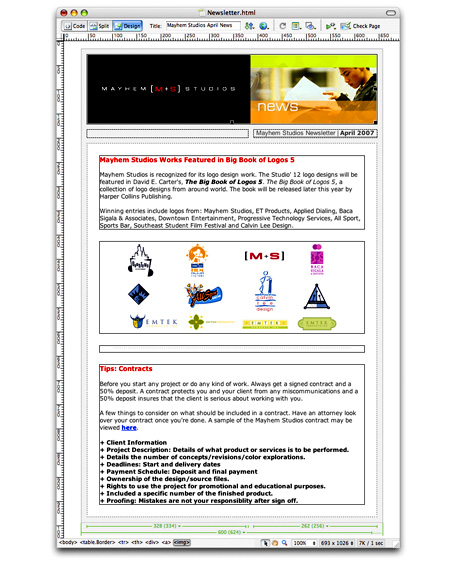
Make sure all your images are linked absolute and not relative. Meaning it should have the complete url, http://www.xyz.com/images/image.jpg. If not, the images may not display on email clients or web based email clients like Yahoo, MSN or Gmail.
Also use html tags or inline CSS to style the text and links. Most email clients like Mail, Thunderbird, Entourage and Outlook will display the CSS fine. Web based email clients will strip the CSS. I tested on Yahoo and Gmail. Yahoo is the the only one that will displays the CSS.
Step Three
Now use a ftp application like Transmit/Fetch to upload the html/images to your server or hosting. Go to the url location where the html page is located in Safari.

Step Four
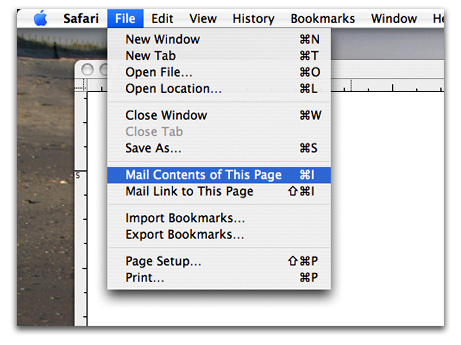
In Safari, go under the menu bar > File > Mail Contents of This Page (Command i). It's going to place the contents of the html page/images into the body of the email in Mail.app.
Step Five
The final step is to enter the email addresses and sent. Depending on your ISP. They will only allow you to send a certain amount of mass email addresses at a time. My suggestion is to send smaller batches of 20 emails at a time.
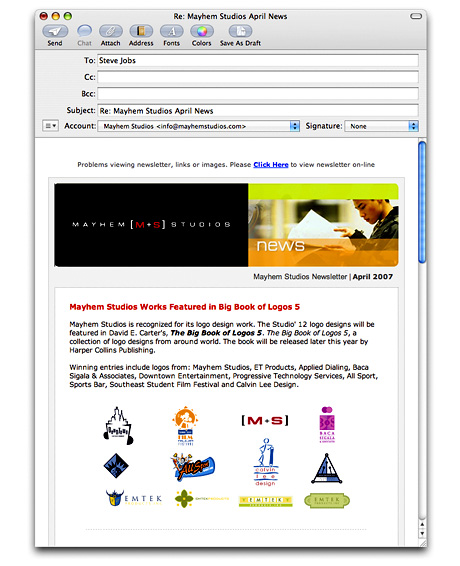
You can see the final newsletter.
That's All Folks!
- mayhemstudios's blog
- Login or register to post comments


Great tip!
I started using the mail page function last year and it's made my life infinitely easier.
WOW
Thanks Ivan!!! I've been wondering how to send an HTML email for awhile now, I was actually going to go down to the IT dept soon and ask them if they knew.
I should have figured it would be this easy on a Mac!
GREAT POST! I will put this feature to use very soon.
When i go to "mail contents
When i go to "mail contents of this page, this is the message I get:
"Safari couldn’t create an email message because Microsoft Entourage doesn’t support sending webpages from Safari.
You can use the Mail application included with Mac OS X to send webpages."
I have quit out of Entourage and only had mac Mail open, but i still get that message, any suggestions?
You probably have to set
You probably have to set mail.app as your default email app when trying to send it.
- Cal
__________________________
Calvin Lee | Creative Director
www.mayhemstudios.com
For italian people I wrote a
For italian people I wrote a similar post in my blog:
http://www.scattodesign.com/blog/come-inviare-unemail-html/
Great article
Keep em coming! =)
Hmmm ok, if inline css works
Hmmm ok, if inline css works best , two things.. Why do you have styles in the header?
And what app or app settings can automate the styles into the tags instead of the header under the wysiwyg tools?
I know photoshop makes slices... hmmmmm me goes to read some more * Amazing ! all of this "make your page standards compliant " and then Poof! I gotta make it all hack nyed now just to send an email ... the nerve ! , sigh webdesign and its many rules... Makes you kinda wish you could code in C instead
Thanks
I've been wondering how to do this without using an applescript for some time.
^^
Hogskunk
create an html newsletter on your mac
thank you soooo much for this info!
apple is just so cool! it's much easier & simple than on a pc. (well what's new hey!)
well just wanted to say thanx for this article!
Small Snag
One small problem with this tutorial but I am sure there is a simple solution for this, but mail does not display background images used in your css. I suppose you can avoid them but it may ruin your design and limit what you can display. Then again, I'm a fan of less is more. :)
newsletter
Hi, I just suscribed to this post, thanks for the tip but my problem is that my Safari version 1.3.2 does not allow me to "mail content on this page".
So do you have any solution?
Thx
Fidi
Use iWeb...
Create your newsletter in iWeb, choose "publish to folder", then follow steps 3 + 4 from there. Easy as pie.
Used it with iweb
Created a small page in iweb..... same basic attributes as web page. Created a new folder on my idisk and copied my images there. Then used the insert option in iweb and chose the images off my idisk. Publised and did the Mail contents of this page option. Mailed to myself and everything worked fine (small page worked in FF, Outlook etc.
When I forward, the images are not found...just those stupid blue-boxed questions marks. Way easy to do this....so I'd like this to work so I can use it with Mailman..... any ideas?
adventure 79-82
I'm not to sure how iWeb
I'm not to sure how iWeb works but the images need to be absolute linking. Meaning it has to be http://www.xyz.com/images/sample.jpg not images/sample.jpg.
It's probably looking for the images on your drive, which it can't see. That is why the images are missing. You will need to host the images somewhere and give the path to them.
Calvin Lee | Creative Director
http://www.mayhemstudios.com
I thought I was absolute linking
But maybe I'm not.
I created the newsletter in iWeb much like you did with dreamweaver...published to my .mac account. Created a new folder on my idisk and added the image files I was using.... this was all fine. Went to safari and brought up the newsletter .... mailed contents of page and then mailed it to myself to see how it looked....everything was great..... but when I tried to forward to myself, all the images disappeared. I'm hoping to use iweb, publish to a folder and upload the folder to my isp....also easily enough upload and images folder and files as well (iWeb doesn't store images this way, it stores the images as files in a folder associated with each page...... http://www......./thispage.html has a folder ...at http://www...../thispage/image.jpg (gif or whatever). I'm hoping to use the mass mailer on my isp to do the mailing for me and provide subscribe/unsubscribe) (not mail to 20 recipients at a time). I'm starting to think it might be better just to create a pdf file and imbed that.
adventure 79-82
I thought I was absolute linking
But maybe I'm not.
I created the newsletter in iWeb much like you did with dreamweaver...published to my .mac account. Created a new folder on my idisk and added the image files I was using.... this was all fine. Went to safari and brought up the newsletter .... mailed contents of page and then mailed it to myself to see how it looked....everything was great..... but when I tried to forward to myself, all the images disappeared. I'm hoping to use iweb, publish to a folder and upload the folder to my isp....also easily enough upload and images folder and files as well (iWeb doesn't store images this way, it stores the images as files in a folder associated with each page...... http://www......./thispage.html has a folder ...at http://www...../thispage/image.jpg (gif or whatever). I'm hoping to use the mass mailer on my isp to do the mailing for me and provide subscribe/unsubscribe) (not mail to 20 recipients at a time). I'm starting to think it might be better just to create a pdf file and imbed that.
adventure 79-82
your .Mac account may not
your .Mac account may not allow third party linking to files. Post them on a website that you access through ftp, that's freely available on the web, and your images should work.
----
Powerpoint is not a design application
linking to files
Yup, that was it! As soon as I uploaded to my "live" site and not .mac all the images slotted in initially and on forward....so success there, further when I do the mail contents, all the stroke and background images worked fine as well. Now, of course, I want to use the html code to upload to my bulk mailer (phplist). What I'm finding is after uploading the html, the images are requested and I upload those as well....Problem is, background images, stroke, outlines....etc. don't work.....so the newsletter/announcement looks a little flat. Does anyone know what safari does when it performs the "mail contents of this page" feature that maintains the page so well....I've tried saving the email contents as created by safaris" mail contents of this page" but this still won't work....Wouldn't it be nice if Safari actually created a pdf. of the webpage which is just imbedded? ANyon with anyideas,,,, since I really like creating the html file using iweb.
adventure 79-82
Just hard code your html in
Just hard code your html in text edit. That's what I do. :)
----
Powerpoint is not a design application
WYSIWYG
But I thought the whole idea was to be able to use dreamweaver/iweb to crete the html file?
adventure 79-82
The more you code the more
The more you code the more you realize you need to be more solidly connected with the code you write for your sites.
I test my code in three browsers at all times: IE 7, 6 and Firefox. Makes sure I hit the largest segment of the audience and that my sites work on as many computers as possible.
Any coder will tell you Dreamweaver has NEVER been the end all in coding. In fact, they'll tell you the opposite. There's nothing wrong with it, it's just not the best way.
----
Powerpoint is not a design application
ok i give
Fine,
Have it your way..... I finally went ahead and coded the html myself and created the same thing I made with iWeb only with tables and no style sheets
now the only thing is getting this html announcement out there. I have been setting this website up for a charity and would like to periodically send out announcements..... I have installed PHPlist and what I would consider the most basic functions...... just sending the page in a message... requires something called PEAR with performs the "fetch the html and make it look like a webpage" request..... what the heck is a PEAR. and now do i have to learn to write PHP code?.... Does anyone know of a free mail utility (this charity has no budget) that works a little more easily.... I know its not just me, i've just read through 6 forum pages of people trying to get this function working!
adventure 79-82
can iweb really work for this?
i thought that using iweb for the purpose of creating a customised newsletter email would be great. unfortunately i realized that i am not able to generate html with absolute links in iweb and therefore cannot use it to make a newsletter email.
Is this correct? i hope not. Does anyone have a solution for this? Maybe there is some sort of setting that make iweb generate absolute links in its html... maybe theres some other software that can batch process all the relative links into absolute ones?
thanks! hope someone can help.
Build and send your html
Build and send your html email:
Free: http://www.apple.com/macosx/features/mail.html
$25: http://ethreesoftware.com/directmail/index.php
----
Powerpoint is not a design application
This is what I need, and my limitations frustrate me!!!!
Mayhem Studio,
This is exactly what I need, although I need some suggestions to bypass or replace the Photoshop part, have Mac, is there any other freeware/shareware/mac apps that I can use instead of Photoshop?
I need to create an html image embedded mail that will have all original formatting if mailed to other accounts than Mac.
Please, please, please- I needed to have this done yesterday already!!!
GIMP
Get GIMP!
http://www.gimp.org/macintosh/
They have a pc and this mac version. Great program!
----
Powerpoint is not a design application
creating url image
Make sure all your images are linked absolute and not relative. Meaning it should have the complete url, http://www.xyz.com/images/image.jpg.
How do I do this?
You just did it, basically.
You just did it, basically. Here's an example to link to an image in your html doc:
(<)img src="absoluteURL"(>)
(remove parentheses)
Don't just use images/x.jpg in your HTML. It won't work.
----
Powerpoint is not a design application
url images
Thanks
I am using Dreamweaver, not Powerpoint!!!!!
This is my signature. I
This is my signature. I wasn't saying you're using powerpoint, silly.
----
Powerpoint is not a design application
Help
Ok, finely gotit to work
email subject
Does anybody know how to add a subject to the mailto: email?