
Quick tip for anyone running Java Apps
Submitted by William on Wed, 2005-07-06 16:34.
Just a quick tip for anyone here that uses Java Apps, and finds them a bit sluggish. Have you installed the latest Java 1.5 update ? Or as Sun calls it Java 5.0. It really makes them snappier!
If haven't got the update, go over to the Apple OSX Java page and grab the files from www.apple.com/macosx/features/java/
Install the package and then run the app in:
Application > Utilities > J2SE 5.0 > Java Preferences
Use the following settings:
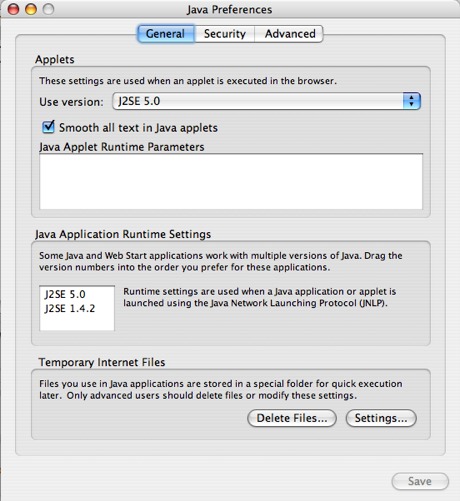
The first option changes the version of Java used in Safari. The second option is for Java Applications.
There are very few Java apps that are even usable, however the ones the I like are:
- Azureus (Bittorrent client)
- Zend Studio (Commercial PHP IDE)
- jEdit (Text editor with zillions of features like built in SFTP)
This will not affect the version of Java used in Firefox, for that you will need the Java Embedding Plugin
»
- William's blog
- Login or register to post comments


How can I tell which version
How can I tell which version do I have?
Java Version Tester
Go to this page in Safari:
javatester.org/version.html
Will
ewww
1.3.1 pretty old i guess. :)
So Firefox users should
So Firefox users should download this then install that JavaEmbed plugin to take advantage of it?
Visit My Website!: - David Bailey - graphic artist - ONLINE PORTFOLIO -
FF
Probably update Java, and then install the plugin. The website says the plugin lets Firefox use the same Java as Safari uses, which is 1.5.
Correction
Install the package and then run the app in:
Application > Utilities > J2SE 5.0 > Java Preferences
Make that:
Install the package and then run the app in:
Application > Utilities > Java > J2SE 5.0 > Java Preferences
Andre
---
Lowering Entropy, one day at a time.
What About 10.3?
I guess 10.3 users are left in the cold? :( I was looking forward to this too when I saw the title of this thread.