
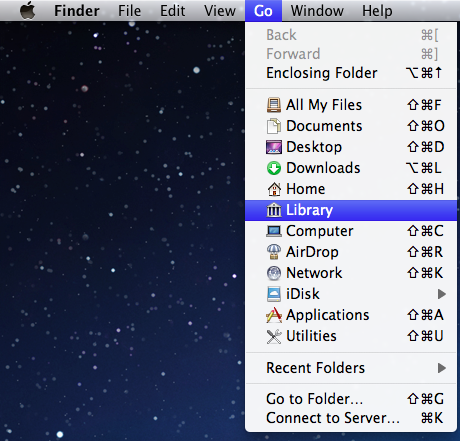
Show the Library folder in OS X 10.7
Ivan | Thu, 2011-08-18 14:59
In OS X 10.7 Lion by default the Library folder under your user is hidden in Finder to avoid new users accidentally deleting or modifying one of the files.
If you ever need to access the files you can do so by pressing and holding the Option (Alt) key and clicking the Go menu in Finder. You will find the Library folder there.
Commenting on this Blog entry is closed.

What I don't understand is why they hide the ~/Library, but not the main Library folder, or the System folder for that matter.
-----------
Visit The Graphic Mac for graphics and Mac OS tips, reviews, tutorials and discussion.
I agree. It's inconsistent.
Great tip!
And another tip in return: did you know that you can 'expose' any app by hovering over it in the dock and scrolling down with three fingers on a trackpad? The app doesn't even have to be open.
Yo can try Funter .
Funter is a freeware Mac utility that can show and hide hidden and system files in Mac OS X, .including the user's Library directory defaults to hiding on Mac OS X 10.7.
You can download it here:
http://nektony.com/funter
Video is also available there.