
I’m going to give a very brief article about improving the PHP setup that comes with Tiger. This is a two step operation:
- Install Marc Liyanage’s PHP
- Install Eaccelerator
I will do some basic benchmarking using phpMyadmin and ab.
Default Setup
If you are interested in the default PHP performance I ran the ab program on the phpMyAdmin main page and got the following results:
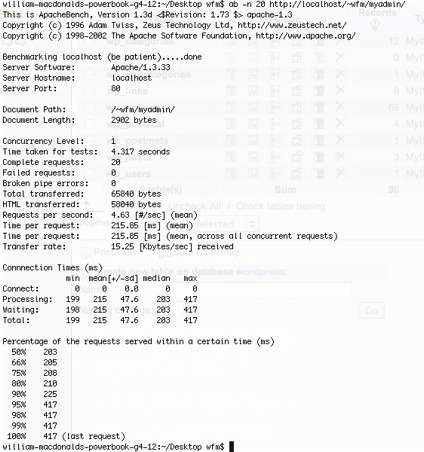
As you can see it took 4.317 seconds to call the homepage 20 times, with the following command:
ab -n 20 http://localhost/~wfm/myadmin/
It is also worth noting:
4.63 requests per second, and transfer rate of 15Kb/sec.
Download the appropriate version of PHP, which is probably PHP 4 on Mac OS X 10.3/10.4. Follow the usual instructions for installing a software package, it should be fairly straightforward.
Using a text editer such as Text Wrangler copy and past the following code, then save it in your Sites folder as info.php:
<?PHP

phpinfo();

?>
Make sure you have websharing enabled, then go to the following URL in your browser:
http://localhost/~username/info.php
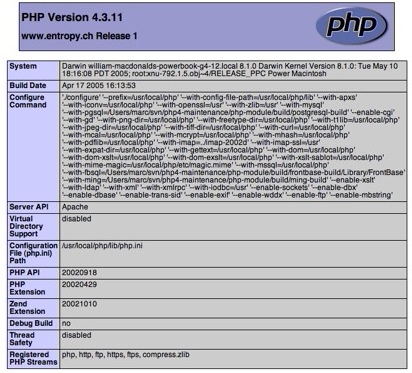
You should see something like the following:
For the next step you need to have Apple Developer Tools installed, and be familiar with using the terminal.
Copy and paste the following URL into your broswer and download to your Desktop:
http://kent.dl.sourceforge.net/sourceforge/eaccelerator/eaccelerator-0.9.3.tar.gz
Open the terminal and running the following commands:
cd ~/Desktop

tar -zxvf eaccelerator-0.9.3.tar.gz

cd eaccelerator-0.9.3

/usr/local/php/bin/phpize

./configure --enable-eaccelerator=shared \ --with-php-config=/usr/local/php/bin/php-config (all one line)

make

sudo make install

sudo pico /usr/local/php/lib/php.ini
Copy and paste the following text to the end of the file:
extension="/usr/local/php/lib/php/extensions/

no-debug-non-zts-20020429/eaccelerator.so" (all one line)

eaccelerator.shm_size="16"

eaccelerator.cache_dir="/tmp/eaccelerator"

eaccelerator.enable="1"

eaccelerator.optimizer="1"

eaccelerator.check_mtime="1"

eaccelerator.debug="0"

eaccelerator.filter=""

eaccelerator.shm_max="0"

eaccelerator.shm_ttl="0"

eaccelerator.shm_prune_period="0"

eaccelerator.shm_only="0"

eaccelerator.compress="1"

eaccelerator.compress_level="9"
Quite and save
Run the following commands:
mkdir /tmp/eaccelerator

chmod 0777 /tmp/eaccelerator
Restart Apache with the following command:
sudo apachectl restart
Copy the file eaccelerator.php to your Sites directory
cp eaccelerator.php ~/Sites/
To test this has worked go to:
http://localhost/~username/info.php
and you should see the following:

Now, do we actually get better performance ?
Running the above exact same benchamrk I get the following:
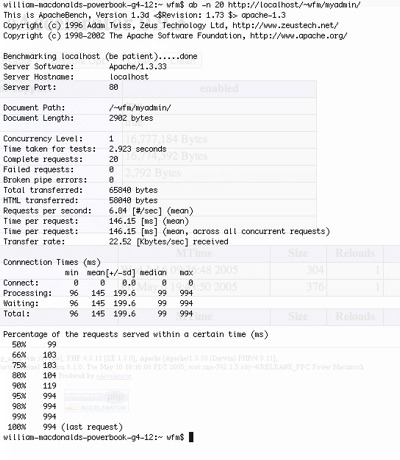
- Total time taken is now: 2.923 compared to 4.317
- Requests/sec is now 6.84 compared to 4.63
- Transfer Rate of 22.52Kb/sec comapred to 15Kb/sec
An improvment ? I think so.
The real benefit of Eacclerator is that it is and optimizer and a cache. What it actually does is to tweak the PHP source code at run time, and then cache the compiled binary. As soon as any changes are made to the PHP code, Eaccelerator notices this and grabs the latest copy.
Let’s hit the cache again
Running the same test again gives the following results:
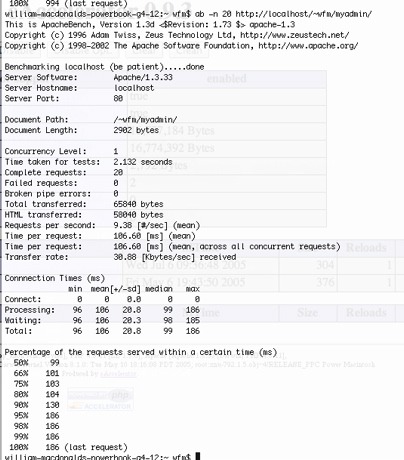
- Total time taken is now: 2.132 compared to 4.317
- Requests/sec is now 9.38 compared to 4.63
- Transfer Rate of 30.88Kb/sec comapred to 15Kb/sec
If you followed my steps above and copied the file eaccelerator.php to you Sites folder you should be able to go to the following URL:
http://localhost/~username/eaccelerator.php
and see the following:
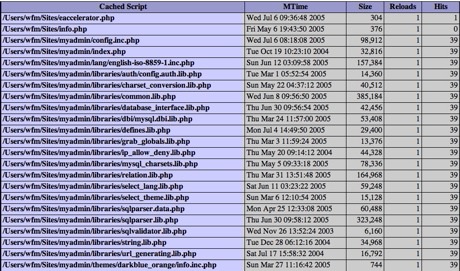
As you can see the PHP files have only been reloaded once, but they have been hit 39 times. Both the benchmarking programs where run 20 times. They were loaded once, and then all the rest of the hits where served by the cache.
The lazy route
Please note, this was compiled using Tiger on a G4. It may not work at all on Panther. I don’t have another machine to test it on. I also presume it is OK to distribute this in binary form. I have not modified the code in anyway. I take no responsibility if your Mac blows up using this.
Install Marc’s PHP as above, download the following file: Eaccelerator.so.zip. Decompress and store in the dir /usr/local/php/lib/php/extensions/. You will probably need to make a directory or two for that. On my machine it has the permissions 755.
no-debug-non-zts-20020429/
Follow the remaining instructions from ‘sudo pico /usr/local/php/lib/php.ini’ above, and it should all work.
If you have problems try doing a tail of the error log to see what is going on.
tail -f /var/log/httpd/error_log
I hope you found this useful. If you have any ideas for future articles on PHP/MySQL then email me on will.macdonald ‘at’ gmail.com
I am plannig on writing an article about MP3 encoding next. This will cover the terrible MP3 encoder in iTunes and how to get better results.
