Quantcast

How to make a new shapes

ZOZX's picture

Write a word (for example Love)
Convert the word to path
Rotate it 45
Duplicate it 7 times
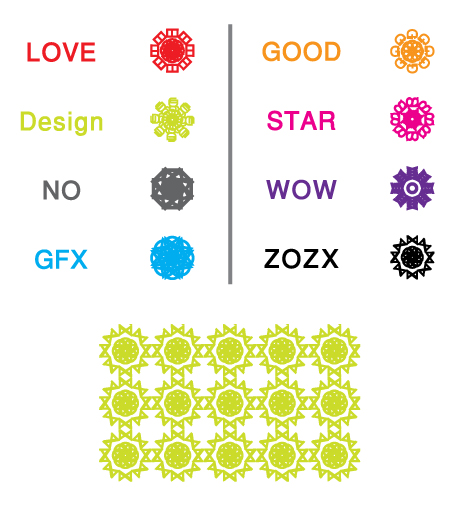
AttachmentSize
Text.jpg167.37 KB
pokie's picture

That's pretty cool! Thanks

That's pretty cool! Thanks for sharing.

cubus's picture

Keep it light

hehe, nice one.
I think the light ones work best.

phalkunz's picture

Cool

Amazing, isn't it? thanks for sharing.

gcoghill's picture

Very cool!

stephanie's picture

Sweet!

I'm definitely going to try that! =]
------------
Perfectly Lost Designs

SMQT's picture

Cute :)

Cute :)

Slow Motion, Quick Thinking

S Baskar's picture

Cool Man:)

Cool Man:)

Cheers,
Baski

bigsadhu's picture

Very nice :-)

After doing this, try selecting all and then using the "Exclude" pathfinder action...

ZOZX's picture

Very nice

WOW, Good Idea bigsadhu

-_- thank you man -_-

stephanie's picture

Wow, the exclude makes it

Wow, the exclude makes it even better! :) Thanks Bigsadhu!
------------
Perfectly Lost Designs

mara06's picture

Fun! Might be a

Fun! Might be a quick-and-dirty way to come up with a logo when nothing else works ;-)

Mara

V. J. Spindler III's picture

how to make new shapes

Being new to Illustrator, I couldn't find how to convert the type to paths. Any help here would be appreciated.

I'm also assuming that your duplicating seven times is copying the rotated paths. rotating another 45 degrees, copying, rotating...

gcoghill's picture

Type to path

You can convert type to path by selecting your type, going to the Type menu and choosing "Create Outlines". Or use the Mac keyboard shortcut: Shift-Command(Apple key)-O

When you rotate the outlined text, just use the Rotate tool and hold Shift to constrain to 45º increments, and also hold down the Option key (on a Mac) after starting the rotation to duplicate. You'll see the cursor change from the solid triangle to a solid & hollow triangle to indicate the duplication.

[

V. J. Spindler III's picture

type to path not available

When I tried that it was greyed out so I couldn't choose it.

ZOZX's picture

O.K.

1- chose text tool, type any word and select it
2- chose ( type ) Menu ===> ( Create Outlines )

ZOZX's picture

■ 4 Windows ■

4 Windows

When you rotate text, use the rotate tool and hold ║ Shift + Alt ║

thanks gcoghill ☺

onegirlcreative's picture

Thanks!

That is really cool. I'm curious, how did you come up with this? How creative.

suzanne maestri-walters :: graphic designer :: www.onegirlcreative.com

--------
"The name's Bond, James Bond."

www.onegirlcreative.com

V. J. Spindler III's picture

brain dead

I started thinking...dangerous, but...thought I'd try something...and it worked. I had been selecting the text with the type tool, NOT the selection tool. Once I used the Selection tool, the create outline was available and it worked! Thanks for sticking with a "newbie." I feel like a dummy after using Photoshop from version 3 and not having a problem. Oh, well, we all have a learning curve.

gcoghill's picture

Forest for the trees…

Glad you figured that out, I guess we all left out that important bit of information.

So to clarify, you want to select your type using the Selection tool, then "Create Outlines" etc.

No need to feel like a dummy when learning Illustrator, especially coming from Photoshop. It's a whole new animal, and things work differently in many situations. Stick with it - you'll become totally addicted to Illustrator once it all starts to click!

kyao888's picture

wow

i'm going to do it to my name.....=)

----------------------------------------------------
Preface Media, Inc.
eCatalog|ePages|Virtual3D|LocateMe
www.PrefaceMedia.com

ZOZX's picture

Thanks a lot for all ;)

Thanks a lot for all ;)

Anonymous's picture

shapes

how do you know how to make the shapes and what kind of paper the you use

User login

Latest critique

suicidal monkeyFor

Internet.Commerce

Partner With Us


Sponsors
