
Free text area selection
Ivan | Sun, 2006-10-22 08:42
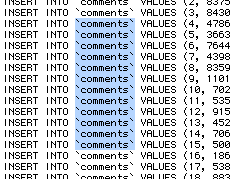
There are certain occassions when you want to make a special non-linear selection in your text editor. You may for example want to select a column of all first characters in a long list. You can select each letter manually by pressing the Apple (Cmd) key, but this is tedious work.
To avoid such waste of time, you can press and hold the Alt (Option) key, click and drag your cursor to select text freely without the constrains of regular text selection. This works in most text editors, such as Textedit and TextWrangler. This feature makes certain programming tasks extremely easy if you use such a selection in combination with Find and Replace command.
Commenting on this Blog entry is closed.

noice!
-------------------------
www.truitt25.com
-------------------------
But can you also write multiple lines with this trick?
ultraedit for Windows let you write in "column mode", so you can write same text along many lines..
--
www.sanbaldo.com
You can paste in text this way, if that is what you asking...
not pasting.. I was thinking of writing:
you select a box --> http://www.ultraedit.com/modules/coppermine/albums/admin/v11/basic/column_mode.png
you start writing...
every line of the box is filled with what you are writing...
(i should make a video of that)
--
www.sanbaldo.com
I don't think OS X can do that out of the box.
I had no idea. That's awesome.
with BB edit you can also make a rectangular selection and add the selected text a prefix or a postfix text.. (so it's a multiple line editing).
--
www.sanbaldo.com
Of course, there's always Vim. Ctrl-q will put you into "block select" mode, allowing you to select both vertically and horizontally.
Very useful when cleaning up code and indenting properly. Recent versions of Vim manage indentation automatically.
vim is for geek.. don't like it
--
www.sanbaldo.com
Try TexMate. There is an add on plugin to do just this and a whole lot more!
Best wishes,
Mark