
This article will explain how to improve the call quality and reliability of Skype for users behind a firewall.
A firewall can be any type of ADSL or cable router that allows you to connect multiple computers to a single Internet connections. This typically uses a technology called NAT. (Network Address Translation)
The are several bits of information you will need:
– The IP address for your computer
– A fixed Port number
– Access to the Router’s configuration pages. This page will be called something like Services, Virtual Servers or Port Redirection
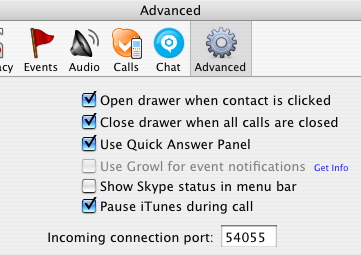
Step 1: In Skype -> Preferences -> Advanced -> Incoming Port, choose random port number that is above 1024. Something between 20000 and 50000, and not the default port. Make a note of this number. Restart Skype.
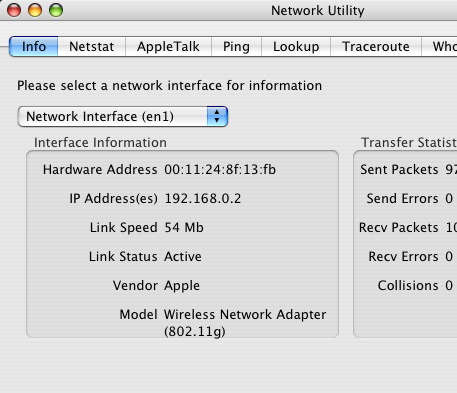
Step 2: In Applications -> Utilities -> Network Utility -> Info Have a look at the IP address of your computer It will be something like 192.168.0.2 or 10.1.0.2
Step 3: Go to your routers configuration page, this will be something like http://192.168.0.1 You may need to use Apple Airport Admin Utility if you use an Airport.
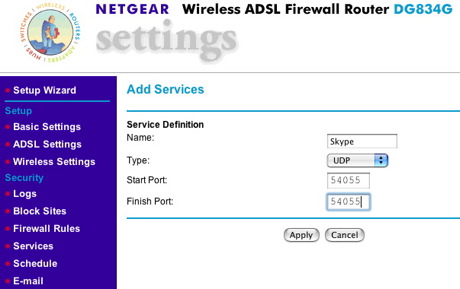
Step 4: Your router will probably have a ready made list of ‘services’, or ‘Virtual Servers’ like FTP, HTTP, SSH. You will need to add your own Skype ‘service’ to this list. Here is how it looks on my Netgear DG834G router. You want it to be TCP & UDP, and only running on a single port. If you cannot have TCP & UDP, choose UDP.
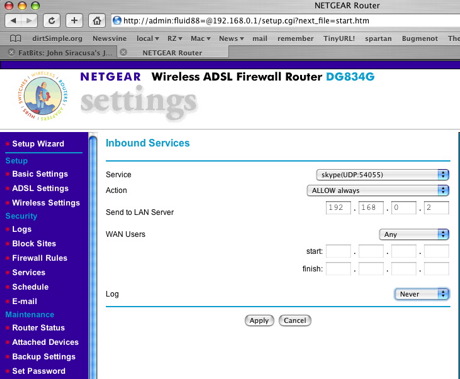
Step 5: You will then need to configure your new Skype service to redirect all traffic on your chosen port to your IP address. I have attached a picture of my router configuration page.
Step 6: If you managed to redirect TCP & UDP you can test your router here: http://www.grc.com/default.htm Scroll down and look for ShieldsUp! Click ‘OK’ a couple of times and then enter your chosen port number and select ‘User Specified Custom Port Probe’. You want to see the Failed sign, and that the port Status is Open. This means that other Skype users can contact you directly.
If you only managed to redirect UDP, you will not be able to test the port forwarding easily.
It is not necessary for both people in the conversation to do this, however it does help. The above steps allow two Skype users to contact each other directly, without having to go through a third party.
If you have more than one computer running Skype you can repeat the above steps with a different Port number.
If you have many people on your network it is probably a good idea to give your computer a fixed IP address and reserve that in the router do the DHCP server doesn’t create a conflict.
When you are using a BitTorrent client you need to follow similar steps to get the best performance. You can see a diagram explaining NAT and port forwarding here, http://www.azureuswiki.com/index.php/Port_forwarding .
The AzuresWiki has other useful info for configuring other makes of routers here: http://www.azureuswiki.com/index.php/Router_configuration .
If you have the OS X Firewall enabled toom you will obviously need to open up your required port. Do this in System Preferences -> Sharing -> Firewall -> New…

Comments are closed.