

I’ve discussed how to change the desktop for the login screen earlier — almost 3 years ago :O, but now with OS X 10.5 things have changed slightly.
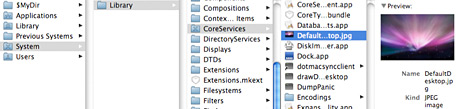
If you want to change the desktop picture behind the login screen you should replace this file: System/ Library/ CoreServices/ DefaultDesktop.jpg with your new image. You will have to enter your admin password to be able to do that.
Read also: The Best Background Remover Tool

Comments are closed.