
Creativebits.org

an All Creative World site
Ivan's picture

The color of the area surrounding the canvas

Use this trick if you ever need to change the grey area surrounding your canvas to any other color for presentations or to simulate the environment your artwork will be placed at (like the color of the wall, web page background, etc.).
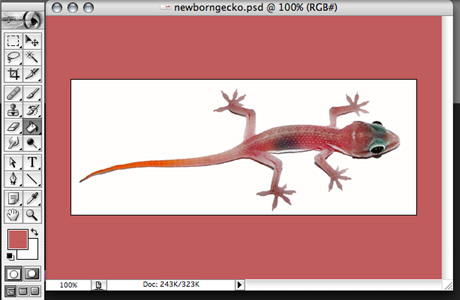

Press F to change to Full screen with menu bar. Select a color, select the Paint bucket tool and Shift+Click on the grey area.

Commenting on this Blog entry is closed.

Anonymous's picture

How do you change it back?

Ivan's picture

Thanks for the comment. The default color is R189/G189/B189 or #BDBDBD. Just select it and use the same technique.

Phosphor's picture
201 pencils

"The default color is R189/G189/B189 or #BDBDBD."

Hmm...The consensus of opinion among users on the Adobe Forums who've been addressing this question for years has agreed that the default color is:

R = 192
G = 192
B = 192

Hex #C0C0C0

75% Gray

L = 82
*a = 0
*b = 0

I'm just about positive that Chrix Cox has confirmed this.

But, be that as it may, a few points difference either way shouldn't make a lot of difference, as long as your monitor is properly calibrated so that there's no color shift in the display toward any hue and away from gray.

phatcactus's picture
109 pencils

I just checked, and this is right, but I'm a little confused as to why 75% B isn't the same as 75% L. Anybody know the story there?

Anonymous's picture

Or just wait til you restart PS

Ivan's picture

Thanks for the comment!

Restarting PS didn't bring back the default color for me. Maybe it's different on a Mac and Windows version?

Josh's picture

Hi,

I couldn't figure out a shortcut to change it back in Windows, so I had to change it back manually. May be the only way?? (Probably not though).

Great tip, by the way!

Ivan's picture

This post has been removed by the author.

Anonymous's picture

This post has been removed by a blog administrator.

Creativebits is a blog about creativity, design and Macs. We also have a critique section where you can post your work to get opinions and a forum to discuss any design related topics.

Recommend us on Google

Latest critique

Do you need a great new logo?

If you need a logo for your company or product you can get it done with us.
In our logo store you can pick from over 28,000 pre-made logos that will be customized to your name for free or you can post a contest for us for just $250 and our designers from all over the world will submit dozens of logo design suggestions to your specific needs.

Marketplace