
Paste by remembering layers in Illustrator
Submitted by Ivan on Sat, 2008-08-30 10:58.

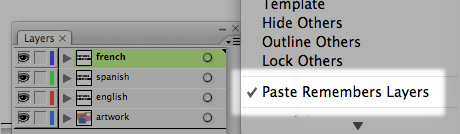
If you work with files that have a common base and several custom layers for languages or other mutations, you should always remember to switch on the Paste Remember Layers option in Illustrator. You will find this option by clicking the little contextual menu icon in the top right corner of the layers pane.
This way when you select objects across several layers in your document and copy/paste it you will retain the layer separation and naming from the source document.
»
- Ivan's blog
- Login or register to post comments


i need this in indesign,
i need this in indesign, too. :(
PS
Photoshop is covered, you can do it with layer folders, not sure how to duplicate this functionality in InDesign. I wish all Adobe apps were more consistent.
tx!
nevevr seen this..tx!
Sweetness
I'm super fluent in Illustrator and I never knew about this feature! Thanks for posting.
Gimme a Break!
Serious graphic artist artist using Vista use Paint 08 and don't have to worry about this kinda stuff!
http://fakesteveballmer.blogspot.com
hello Steve :)
Nice to see you on cb. ;)
Serious graphic artist using
Serious graphic artist using Vista? Those words don't even compute...
"Without deviation from the norm, progress is not possible."
— Frank Zappa
Ditto
Nice to straighten you people out!
http://fakesteveballmer.blogspot.com