
Login background
Submitted by Ivan on Tue, 2005-08-09 09:07.
If you're bored or bothered by the default desktop image that comes up for the login page in Mac OS X read on.
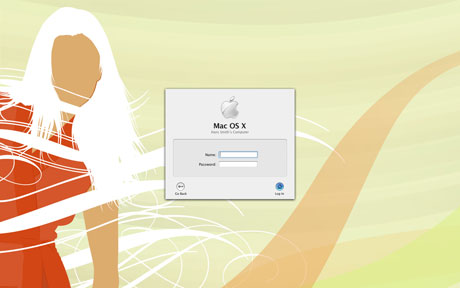
Aqua Blue.jpg is the default image that is loaded for the login page. If you have spotlight you can just start typing the name to find it on your system, but actually it's under your root/ Library/ Desktop Pictures. You should rename this file to keep a backup of it and save your new desktop image into this folder with the name Aqua Blue.jpg.
I personally keep the same desktop image for both the system and the login therefore the startup seems smoother.
»
- Ivan's blog
- Login or register to post comments


Thanks for the tip
Between your posts and Safari RSS letting me know when updates have been made, this place is becoming a favorite of mine. Keep it up!
Mike
--------------------------------
www.infinite-style.com
Totally!
Totally!
Great tip. Now, where might
Great tip. Now, where might we get that wallpaper?
http://mandolux.mine.nu/
i've been looking through
i've been looking through mandolux for the last 10 mins .. great site, but it's a LOT of desktops
any idea where to more specifically find it?
I really like it as well
EDIT: nevermind I found it . i guess it's # 20040401 or something
wallpaper? WALLPAPER? Must
wallpaper? WALLPAPER?
Must be a windozer!
;o)
Trouble finding an appropriate image?
Try imagery that states the obvious. http://budgetstockphoto.com/samples/pics/padlock.jpg
Seems to work well.
great follow up tip
tuaw suggests:
Awesome! Tip:
Awesome tip!
I noticed that if whatever pic I renamed 'Aqua Blue.jpg' was not first alphabetically in the folder, that it would not display.
For example, I renamed the original file to 'Aqua Blue Default.jpg' and the new was 'Aqua Blue.jpg', and my log in was just pure blue - no image.
Renaming the old file so it was not first in an alphabetical list solved the problem for me.
---------------------
Josh Stevens | Nautilus7 Design
My CB Blog
Just curious
After thinking about this for a long time, I just have to know lol...
How in the world do you take a screenshot of your login box?
---------------------
Josh Stevens | Nautilus7 Design
My CB Blog
heh
I faked it in PS. :)
Anyone know how to set a
Anyone know how to set a different wallpaper for dual monitors on a PC?
Another way
Here is another, imho better, way to set the login background:
http://www.macgeekery.com/tips/customization/changing_the_login_window_background_without_renaming_files