
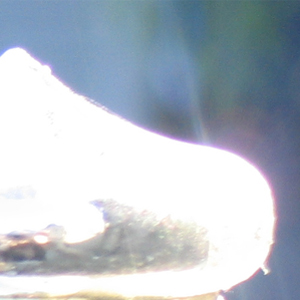
How to get rid of purple fringing
Ivan | Thu, 2006-07-06 11:16
How to get rid of this unsightly effect...There are many technical reasons and some disagreement as to why purple fringing occurs in digital cameras. These factors include the lens, focus, leakage between pixels, and more...
What to do! You have taken a lovely photo, only to take it home and discover this purplish haze around the edges of the subject??
The most common cause of purple fringing is low light with high-contrast boundary areas in an image. So in the case of my example above, I took a photo of a reflective surface on a sunny day with the sun shining behind it.
Oh woe is me! Well.. never fear.. there is a way to fix this photo using Photoshop, I am going to show you the way that was easiest for me, of course there are a number of ways to do this... but I found this method to be the easiest to remember and most effective!
Step 1: Open up the image in Photoshop
Step 2: Using the toolbar, select image>adjustments>hue/saturation. A small hue/saturation box should appear on the screen.
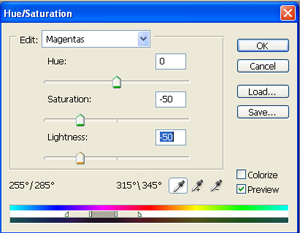
Step 3: In the drop down menu that says Master, select Magentas. Now move the saturation slider down to -50, and move the lightness slider down to -50.
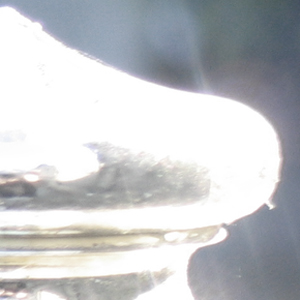
Step 4:If needed repeat steps 2 and 3
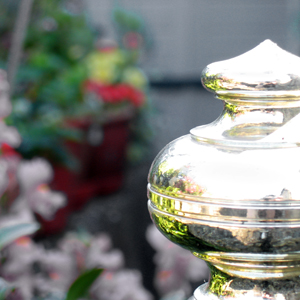
Now the Purple Fringing is gone.. Hoorah!!
Thanks to Hilary Quinn from Freestockmagic for allowing me to reproduce her tutorial.
- Ivan's blog
- Login or register to post comments


Thanks Ivan for posting this!!!
__
GOO
__
Goo
Whilst there is nothing wrong with this trick, if you had anything else in the photo that was of magenta hue then it would affect these areas also. What I would suggest is to create a wide, nicely feathered selection of the purple fringed area first and then try this neat trick. This is how I've got round simular problems in the past. :o)
You could/should use an Adjustment Layer instead of doing an Image Adjustment. That way if you save the document [as a PSD] you can edit it again later without having destroyed any of the data.
Just yesterday, I took a picture (on commercial assignment) that I considered unusable. Until now.
http://www.jimdugan.com/purplehaze/
I do agree that you should select the area.
But I was delighted to find that it worked fine (on this image) without selecting.
And adjustment layer is also a good idea.
By the way, may I share my "Saturation Trick" learned somewhere on the internet years ago?
When an image needs more saturation, just using hue/saturation/lightness often works OK. But for more control and more radical needs, do the following:
Make a duplicate layer.
To the duplicate layer:
Hue/Saturation/Lightness: saturation up 70 (yes, it's ugly, be patient)
Gaussian Blur: 6 pixels (still ugly, I know)
Set Layer Blend Mode: Saturation (ah, better, yes?)
Change Opacity to suit (for me, it's usually 20-40%)
And you can easily make an action of the above, to re-use whenever you need to. I hit f-5 to do this. I use it almost every day.
Why is this even a tutorial? This is some pretty basic, common sense Photoshop. No offense but was a waste of time to make and a waste of everyone else’s time to read. I was not aware this was Photoshop for people that were unaware you could control hue and saturation (gasp!). I'll await your responses in retaliation. But don’t expect me to pay attention to this website if this is the standard.
I agree, this is a very basic tip, but we post tips in different levels.
I understand creativebits.org follows:
http://creativecommons.org/licenses/by-nc-sa/2.0/
Waleed
www.waleedsgallery.biz
You are obviously a very inteligent person as you are already expecting retaliation to your comment. Now instead a wasting our time reading your critisizm why not enlighten us with your professionalism.
Please extend us the courtesy of letting us decide what we would like to read.
You are not the spokesman for this blog.
Thanks Ivan..
A bad lens is usually the reason for chromatic aberration.. Where you can find red fringing, you'll also find cyan... and Where you can find blue fringing, you'll also find yellow. They're usually at opposite sides of a subject in a photo.
I have one lens that causes that effect, and I fix it in the Adobe Camera RAW controls in Photoshop:
Waleed
www.waleedsgallery.biz
Hi! I initially wrote this tutorial for sxc, and Im delighted to see the trick benefitting people such as Jimmer, who had no idea how to get rid of purple fringing.
"Why is this even a tutorial?" was stated by Duluoz, this helps people such as Jimmer, and others, and was designed for a user who had no previous experience with photoshop whatsoever. This is why the tutorial is short and to the point. The reason it works so well, is because it is not perfect, but its easy, very easy, and a great starting point for someone learning Photoshop.. then they progress from this to using adjustment levels, feathering, masking etc..
If you are already beyond this level, this tutorial is obviously of no help to you, please try to be polite and respect the fact that there are beginners out there that dont even know how to create a layer, everyone has to start somewhere, me included, and when I found this technique, it started me off on learning more. I never would have even done it if the technique involved anything more advanced because I just wouldnt have known how!!
Anyway, Im glad its helped one person here anyway! :) And to anyone that thinks its rubbish, just remember where you came from, there was a time when you didnt know it all either you know!!
This is an open community. If you don't appreciate this tutorial you don't have to read it. Some people may find it interesting while others may find it pointless. You don't have to get all angry over it. Just by reading the comments you can tell it has helped out a few people already.
Not all tips are this basic. CB is a wonderful site and I encourage you to keep reading as I'm sure you will find something useful.
P.S. Ivan just had a baby, I'm sure he can't spend too much time detailing tutorials for us right now!
This is a light in my darkness, this tuttorial is great, and I didnt know this, Thankyou.... and for the one that got his liver on his hand, put it away you are not the only member! really we are a community not a battlefield...
Thanks for the tuttorial...
Later
Caya
We´ll always have Paris! Humphrey Bogart
This is the UV light that has a different frequency and speed. When light hits the egde of a subject it is refracted by the outer molekules and its frequency changes so it gets purple and it is not because of a bad lense. This means the purple fringe is there but we cant see it. I hope this is an ultraviolet light in your light now Amigo.