
Screenshoot blurry in OS X?
Submitted by Ivan on Thu, 2008-07-03 20:57.
Have you noticed that screenshoots you make with the key command Apple-Shift-3 or Apple-Shift-4 are somewhat blurry and not pixel perfect? That is because by default the screen-shoot format is a made as a jpeg set to resolution 60. That's pretty low and therefore it produces small file sizes which is good for most uses, but not if you want to see every pixel in detail.
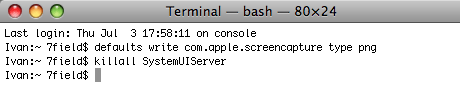
To fix this issue you have to set the deafult screenshoot format to png, pdf or tiff. You can do that with Terminal. Type these commands:
defaults write com.apple.screencapture type png
killall SystemUIServer
Press return after each line and replace png with pdf or tiff as you wish. Notice how sharp is the screenshoot above. ;)
»
- Ivan's blog
- Login or register to post comments


NICE!
Thanks for the tip! I've been taking a lot of screen shots at work lately for online trend research. This'll make my presentations that much better!
My screenshots are crystal clear...
But then again, I use Snapz Pro ;-)
-----------
Visit The Graphic Mac for graphics and Mac OS tips, reviews, tutorials and discussion.
Jing or Skitch
You could also use Skitch (http://skitch.com/) for local capture & sharing or Jing (http://www.jingproject.com) for sharing.
Onyx can change sc
The free Onyx maintenance utility for OS X can be used to change screen shot format to any of a dozen or so different formats.
http://www.titanium.free.fr/pgs/english.html
Er.. PNG is the default
Er.. PNG is the default since 10.4. Not JPG.
Yea
I was just gonna say my screenshots appear as pngs.
Hm.. strange. On my fresh
Hm.. strange. On my fresh Leopard installation jpg was the default.
Did you install Leopard
Did you install Leopard yourself? If not it could have been someone before you that changed it... donno... lol
But PNG has been the default since 10.4, before that it was PDF, which was a bit of a pain in the ass when you quickly wanted to show a windows user something (most idiots back then didn't have any PDF readers instealled, yay... lol). I don't recall if 10.3 even had any hidden system settings to change the format.
Not sure, but I heard
Not sure, but I heard complaints about the blurry screen shoot problem from several Leopard users.
I love PNG
I admit I use JPG for a lot of the photos, but I just love the PNG format flexibility with transparency.
The only reason I use it for photos is that it compresses the images smaller than the PNG format. But for the most part, everyone who visits graphics-related sites is most likely using broadband anyway, so the extra 10-20k per image probably isn't worth worrying about.
-----------
Visit The Graphic Mac for graphics and Mac OS tips, reviews, tutorials and discussion.
Awesome, thank you. (my
Awesome, thank you.
(my first comment on here & thats about as wise & witty as it gets from me... :(
_ _
www.wedocreative.com
www.friendfeed.com/zee
Even stranger in 10.5.3
My default is png and I tried to capture your terminal screenshot above three times resulting in three different blurry PNG images. Sometimes the blurriness stretches horizontally on the text in the image, sometimes vertically. Never noticed this before :-/
Ouch!
This post showed up on TUAW and is getting hammered in the comments section. Funny thing is, they aren't bashing Ivan or CB, but TUAW itself simply for linking to an inaccurate article. LMAO. So CB gets free hits, and TUAW gets bashed. LOL!
-----------
Visit The Graphic Mac for graphics and Mac OS tips, reviews, tutorials and discussion.
Take control - a simple method (this is a personal opinion)
Cocktail (by Maintain) features ways to alter the screen capture configuration on all the latest OS X versions (Panther -> Leopard). It also features other ways to customize your os, e.g. dock, cache-deletion, permission fixes, etc.
check maintain.se
Still blurry...
Hi, this is my first time posting...
I just installed Leopard and am having the same issue...my screenshot is blurrier than the screen. My default format is png, but I tried tiff as well (changed in terminal) and still blurry in preview and photoshop. Is there another option I can try? I rely on clear screenshots for my work — any help would be much appreciated, thanks in advance.
ps: I'd prefer not to install any 3rd party apps if possible
(No subject)